
E-commerce Visuals with Multimodal Generative AI: Lifestyle Shots and Variants
Stop paying thousands for a single photo shoot. That is the promise of Multimodal Generative AI in e-commerce visuals. It turns your basic white-background product photos into rich, contextual lifestyle images instantly. You get models wearing your clothes, products sitting on sunny beaches, or beauty items being applied in realistic settings. All without hiring photographers, booking studios, or waiting weeks for editing.
This technology is not just a fancy filter. It uses advanced machine learning to understand the shape, texture, and lighting of your product, then places it into entirely new scenes generated from text prompts or scene databases. For small teams and solo entrepreneurs, this means you can produce high-volume marketing assets that look professional and drive sales. But how does it actually work, and where do things go wrong?
How Multimodal AI Creates Lifestyle Imagery
To understand why this works, we need to look at what "multimodal" really means. Traditional image generators take text and make an image. Multimodal systems, like those powering platforms such as Instant or Komar, combine several inputs. They analyze your uploaded product photo (image input), interpret your specific instructions (text prompt), and often reference a library of pre-built scenes or demographic models.
The process usually follows a clear path:
- Upload Reference: You provide a clean product shot. The better the input, the better the output.
- Select Context: Choose a preset scene (like "ombro studio" or "beach day") or write a custom prompt describing the environment.
- Add Models: Select human models if needed. Platforms offer diverse options, such as female model "Astrid" or various male variants, ensuring your audience sees themselves using the product.
- Generate & Refine: The AI renders the image. You can tweak parameters like aspect ratio (1:1 for Instagram) or aesthetic effects (like a "grainy film look").
Under the hood, these tools use powerful models like Gemini 3 Pro for high-fidelity details or specialized variants like the NIA model for specific commercial tasks. This architecture allows the system to keep your product recognizable while completely changing the world around it.
Why Brands Are Switching to AI Variants
The main driver here is speed and cost. In traditional e-commerce, creating a full catalog of lifestyle images requires a massive production budget. You need models, makeup artists, locations, and post-production time. With multimodal AI, the Time-to-Content (TTC) drops from weeks to minutes.
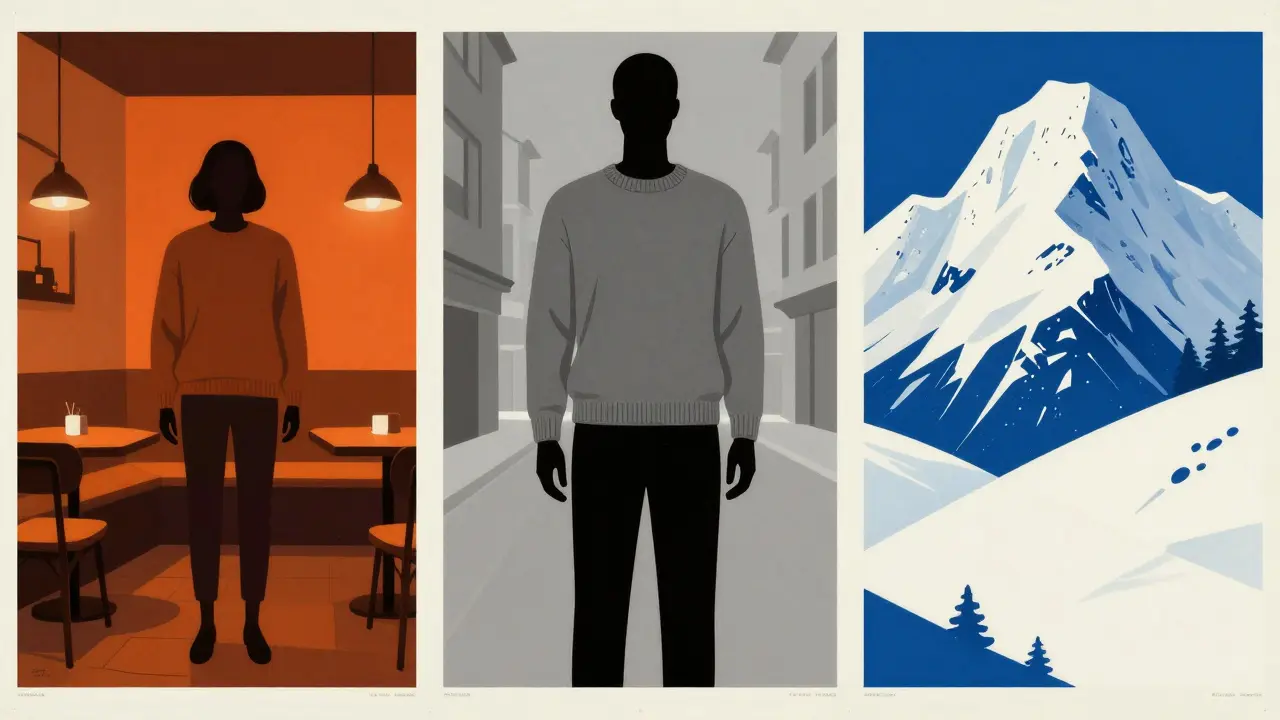
Consider a clothing brand launching a new sweater line. Instead of one expensive shoot, you can generate dozens of variations. One image shows the sweater in a cozy cafe, another on a snowy mountain, and a third in a minimalist urban setting. Each variant targets different customer psychographics. This volume of content is impossible to achieve manually for most mid-sized businesses.
Beyond cost, there is the impact on conversion rates. Research consistently shows that lifestyle imagery outperforms plain product shots because it helps customers visualize ownership. When a user sees a lip balm being applied by a real-looking person in natural light, they connect emotionally with the product. AI allows you to create these emotional hooks at scale.
| Feature | Traditional Shoot | AI Generation |
|---|---|---|
| Cost per Image | $50 - $500+ | $0.10 - $2.00 |
| Turnaround Time | Days to Weeks | Seconds to Minutes |
| Variety of Scenes | Limited by logistics | Unlimited (prompt-based) |
| Model Diversity | Requires casting | Instant selection |
| Product Accuracy | High (real object) | Variable (depends on input) |
Critical Limitations: Where AI Struggles
It is crucial to be honest about the current state of the technology. It is not flawless. As noted by industry testers at FStoppers, AI still struggles with consistency, fabric accuracy, and resolution. If you upload a single front-facing photo of a complex garment, the model has to guess the back, the side, and the texture. Often, it guesses wrong.
For fashion brands, this is a major hurdle. A seam might appear in the wrong place. The fabric might look like plastic instead of cotton. To mitigate this, you cannot just throw any photo at the AI. You need a standard e-commerce set: front, side, back, and ideally a close-up texture shot. Even then, you must review every output carefully. AI might add extra fingers, distort logos, or change the color slightly under different lighting conditions.
This means AI is currently best used as an augmentation tool, not a total replacement. Use it for social media ads, blog posts, and initial concept testing. For your primary hero images on the homepage, you might still want real photography to ensure absolute brand control and detail fidelity.
Best Practices for High-Quality Outputs
To get the best results from tools like Instant or Komar, follow these practical steps:
- Start with Clean Inputs: Ensure your product photos have no shadows, watermarks, or distracting backgrounds. The AI needs to isolate the product clearly.
- Provide Multiple Angles: If possible, feed the AI front, back, and side views. This gives the model more data to construct a 3D understanding of the item.
- Be Specific in Prompts: Instead of "on a beach," try "model laying on sand, golden hour lighting, natural grain effect, applying lip balm." Specificity reduces hallucination.
- Use Batch Generation: Don't stop at one image. Generate five or ten variants with slight changes in pose or background. Pick the winner.
- Check for Artifacts: Zoom in. Look at hands, feet, and text on packaging. AI often fails here. Retake or regenerate if errors exist.

Integration with E-commerce Workflows
The real power comes when this tech plugs into your existing stack. Many platforms now integrate directly with Shopify or WooCommerce. This means you can pull your latest product uploads straight into the AI generator. No manual downloading and re-uploading.
You can set up automated workflows where new products automatically get three lifestyle variants: one for Instagram Stories, one for Facebook Ads, and one for Pinterest. This keeps your content pipeline fresh without adding headcount. For marketers, this shifts the role from "creator" to "editor" and "strategist." You spend less time taking photos and more time analyzing which lifestyle context drives the most clicks.
The Future of Visual Commerce
We are in a transitional phase. Today, the outputs are "adequate" for many uses but require human oversight. Tomorrow, as models like Gemini evolve, the gap between AI and reality will close further. We will likely see dynamic visuals where the background changes based on the user's location or weather, all generated in real-time.
For now, the smart move is to experiment. Test AI-generated lifestyle shots against your traditional photos in A/B tests. Measure the lift in engagement and conversion. You might find that for certain product categories, like accessories or simple apparel, AI is already good enough to handle 80% of your visual needs.
Is AI-generated lifestyle photography legal to use for ads?
Generally, yes, provided you own the rights to the original product image and the AI platform grants you commercial usage rights for the output. Always check the Terms of Service of the specific AI tool you are using. Some free tiers restrict commercial use, while paid plans typically allow it.
What is the best AI tool for e-commerce lifestyle images?
Platforms like Instant and Komar are leading solutions specifically built for e-commerce. They offer features like Shopify integration, consistent model generation, and batch processing. General-purpose tools like Midjourney are powerful but lack the product-consistency controls needed for retail.
Can AI replace professional photographers entirely?
Not yet. While AI excels at generating lifestyle contexts and variants, it still struggles with precise fabric textures and complex garment structures. Professional photography remains essential for high-end brand identity and detailed product reference shots that serve as inputs for the AI.
How much does it cost to generate lifestyle images with AI?
Costs vary by platform, but generally range from $0.10 to $2.00 per image depending on resolution and speed. This is significantly cheaper than traditional shoots, which can cost hundreds of dollars per image when including modeling, styling, and editing fees.
Do I need technical skills to use these AI tools?
No. Most e-commerce-focused AI platforms are designed for non-technical users. They feature drag-and-drop interfaces, preset scenes, and simple prompt fields. You do not need to know coding or machine learning theory to generate high-quality visuals.






the epistemological crisis of the digital age is here folks. we are trading authentic human labor for silicon hallucinations. it is a dystopian feedback loop where the algorithm dictates reality rather than reflecting it. who controls the prompt controls the narrative. big tech is building a panopticon of aesthetics. your data is being mined to train the very models that will replace you. stay woke or get left behind in the analog dust.
i think this is actually pretty cool for small businesses trying to get off the ground. i know a few friends who run online stores and they struggle so much with budgeting for photoshoots. if this saves them money and helps them show their products better, thats a win in my book. just glad people are still involved in checking the quality at least.
does anyone else feel like were moving too fast with this stuff? i mean sure its cheap but what about the artists who spent years learning lighting and composition? it feels kinda unfair to just automate all that away. also i noticed some typos in the article but the point stands. we need to be careful about how we define value in creative work.
This is a fascinating development in the e-commerce landscape 📈. The efficiency gains are undeniable, but I believe there must be ethical boundaries regarding transparency. Consumers deserve to know when an image is AI-generated versus real photography. It is not about stopping progress, but ensuring trust remains intact in the marketplace. What do others think about disclosure requirements? 🤔
you see right through the veil of corporate greed dont you because they want to strip mine our visual culture until nothing but plastic shells remain and then sell us the idea that this sterile void is progress while the algorithms whisper sweet nothings into our ears telling us exactly what to desire next based on our deepest insecurities which they harvested from every click and scroll we have ever made creating a perfect closed loop of consumerist hell where authenticity is dead and long live the simulation that keeps us docile and buying things we do not need from brands that do not care.
The moral implications of this technology are deeply troubling when one considers the erosion of human dignity in artistic expression. To reduce the nuanced craft of photography to a mere computational exercise is to devalue the very essence of human creativity. We must resist the temptation of convenience at the cost of our soul. A society that accepts synthetic imagery without question is a society that has lost its way. We should demand higher standards of integrity in all commercial endeavors.
Your analysis lacks rigor and fails to address the fundamental flaws in your argument. The notion that AI can replicate the subtleties of light and texture is preposterous. One must possess a certain level of aesthetic literacy to understand why these generated images feel hollow. Furthermore, the casual dismissal of traditional techniques by proponents of this technology reveals a profound ignorance of photographic history. Do better.